An IT asset tracker that lives in one Excel file
Track every laptop, monitor and licence: who has it, where it is, what it cost, what it is worth now, and when the warranty runs out. The free hosted option stops at 250 assets and then bills you by how many you own. This one never counts them — your data stays in a spreadsheet on your machine, with no database to stand up, no account and no monthly bill.
One-time purchase · free updates for life · works completely offline
Free until 250 assets, then it is a yearly bill forever
Asset tracking tools are either free but need infrastructure, or easy but never stop charging you. This is the third option: a spreadsheet you already know how to use, with the reporting built on properly.
| Self-hosted (Snipe-IT, GLPI) | SaaS asset tools | This tracker | |
|---|---|---|---|
| Cost | Free software, paid server | From ~$35/mo, forever — often priced by asset count | $149 once |
| At 1,200 assets | Server, patching, backups — your time | ~$480 a year, every year | $149, once. Same price as at 12. |
| Setup | Web server, database, PHP | Create an account | Open a file |
| Works offline | Only on your LAN | No | Yes, completely |
| Where your data lives | Your server | Their cloud | Your .xlsx, on your disk |
| If you stop paying | — | You lose access | You keep everything |
| Who maintains it | You do | They do | Nothing to maintain |
The three things I kept not finding together
I am not going to tell you which product is missing which feature — they all change, and I would rather be accurate than clever. But across twenty years and a lot of these tools, the same three gaps kept coming up, and I could never get all three in one place without paying for a tier I did not otherwise need.
People, and checking things out to them
Plenty of tools will hold a list of what you own. Fewer let you add your actual staff and sign a laptop out to a person, stamped with a name and a date, so that a month later you can still answer who had it — and so the day someone leaves is a filter, not a memory test.
Locations
Knowing you own a monitor is not the same as knowing which office, which floor or which store room it is sitting in. If you cannot record where a thing lives and move it when it moves, you are still walking around looking for it.
Scanning
Typing a twelve-character serial to look one item up is what quietly kills the habit. A scan is the difference between a stock-take being one walk round the room and being an afternoon.
All three are in here, at the one price. There is no tier above this one, no per-asset fee and no charge for adding another admin.
Coming from Snipe-IT, AssetTiger or EZOfficeInventory?
I have used all of these, and more, across twenty years of corporate IT. They are good products and I am not going to pretend otherwise — but each one asks you for something. Here is the honest comparison.
| What it asks of you | Where this is different | |
|---|---|---|
| Snipe-IT | Free and open source, but you host it. Web server, database, PHP, updates, backups. | Nothing to host. Open a file. |
| GLPI | Powerful, and a genuine project to stand up and maintain. | Five minutes, no maintenance. |
| AssetTiger | Free tier removed — a 30-day trial now, then a bill that scales with your asset count. Your data lives in their cloud. | No asset limit. Your data is a file on your disk. |
| EZOfficeInventory | A subscription metered on how many items you track. Unlimited users, but it never stops. | One payment. No seats, no renewal. |
| A free Excel template | A list of columns. No dashboard, no check-out log, no depreciation. | All three, plus reports and bulk import. |
If you need permissions enforcement, SSO or real-time multi-user sync, buy one of the tools above instead — this is not that, and I would rather say so here than refund you later.
Everything you would otherwise build yourself, already built
Depreciation, calculated for you
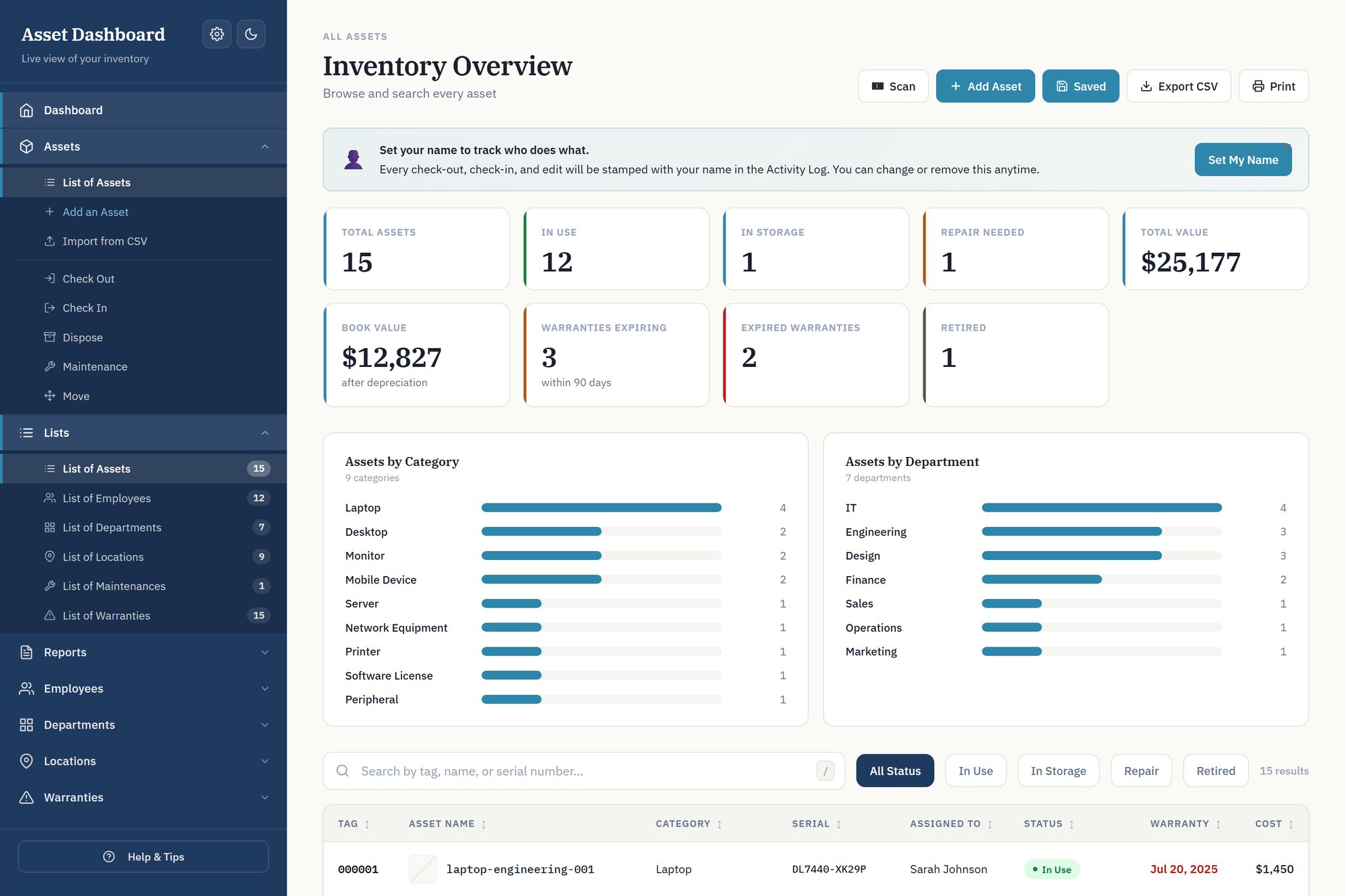
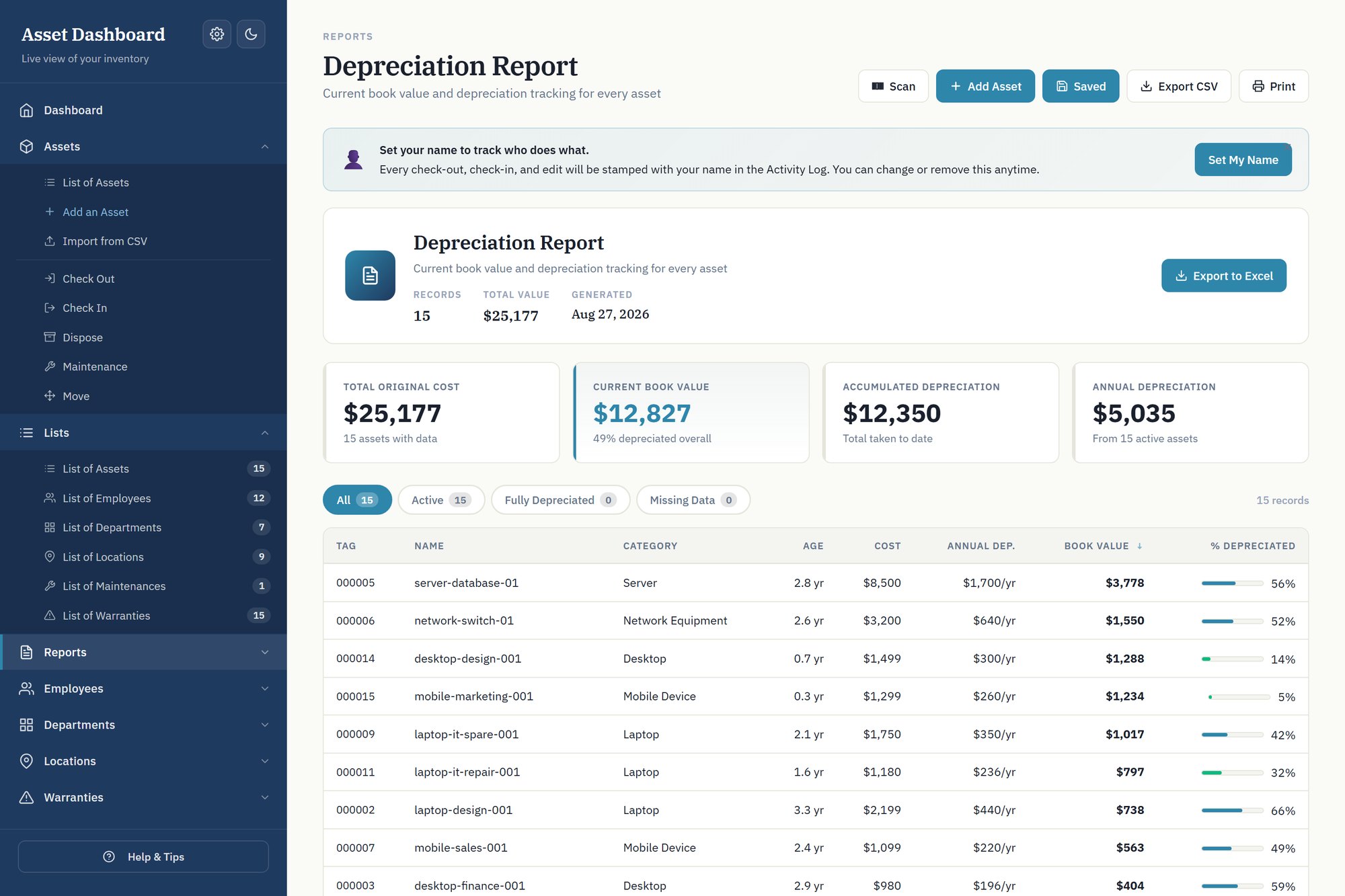
Straight-line depreciation per asset on a 3, 5, 7 or 10 year schedule, with optional salvage value. Book value sits next to original cost on the dashboard, and the depreciation report totals accumulated and annual figures across the whole estate — the numbers your accountant asks for at year end.
Warranties that warn you before they lapse
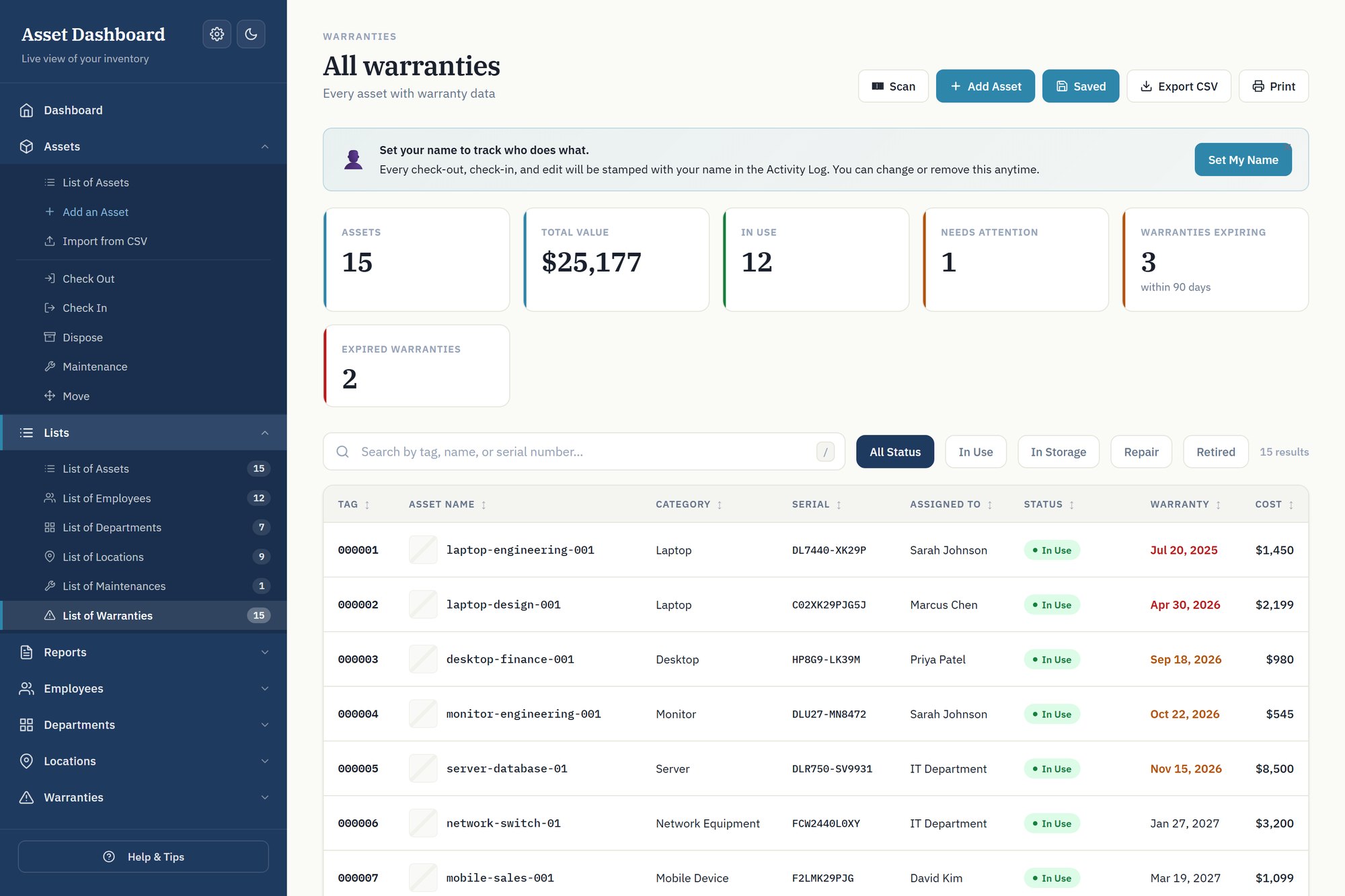
Every warranty is tracked and bucketed — expired, inside 30 days, 31–60, 61–90, or healthy. The dashboard shows the count so a renewal never surprises you, and one click drills into exactly which machines are affected.
Bring your existing list in bulk
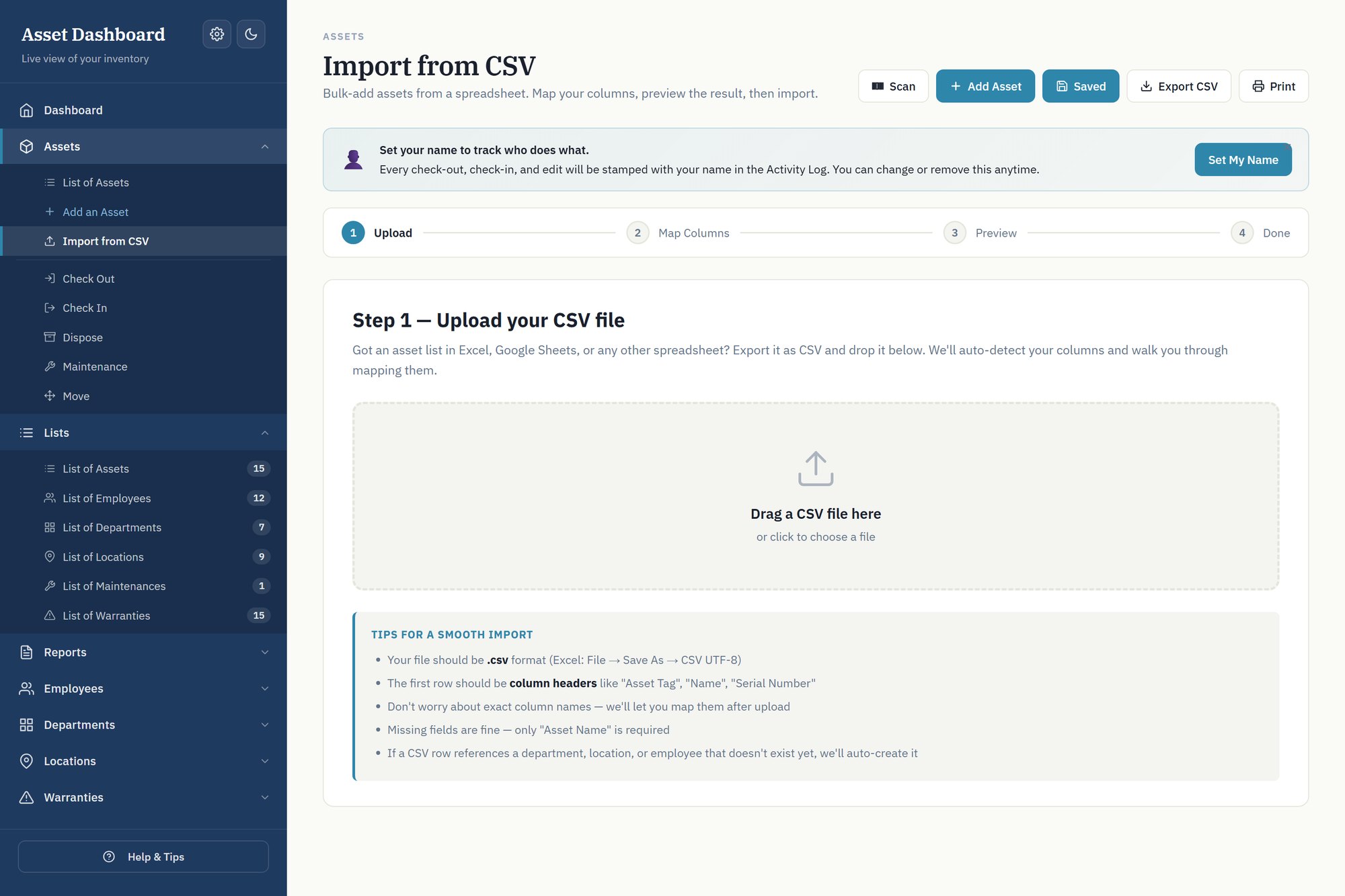
Already have assets in a spreadsheet? Export to CSV and drop it in. Columns are auto-detected and mapped, conflicts resolve as skip, update or add-new, and unknown employees, departments and locations get created for you. There is a five-minute undo window if you change your mind.
Scan a barcode instead of typing a tag
Every asset has a tag, and the dashboard reads them. A $25 USB scanner is the option that works everywhere — plug it in on any machine and it simply types the tag for you. Camera scanning is a browser feature rather than ours, so it depends on the device: it works on an Android phone or tablet, but Chrome and Edge on Windows do not support it, and neither does Safari on an iPhone or iPad. The USB scanner is the answer there. Sticky mode keeps the scanner open so a stock-take is one pass round the room rather than one lookup at a time.
Print your own labels
The Labels button turns whatever is on screen into a printable sheet of barcode labels — asset name, barcode and tag, three across, on plain paper or peel-and-stick sheets. Filter first and you label just that subset. Nothing is uploaded to make them; the barcodes are drawn in the page.
Check-out, check-in, and a log of who did what
Assign hardware to a person, move it between locations, send it for maintenance or retire it — each action stamped with a name and a date. When someone asks where a particular laptop went, the activity log answers it.
A due-back date, so you know who is late
Checking something out can carry a date it is expected back. Anything past its date shows in its own Overdue filter with how many days late it is, and the date clears itself when the item comes back. Leave it empty for anything that is not on loan.
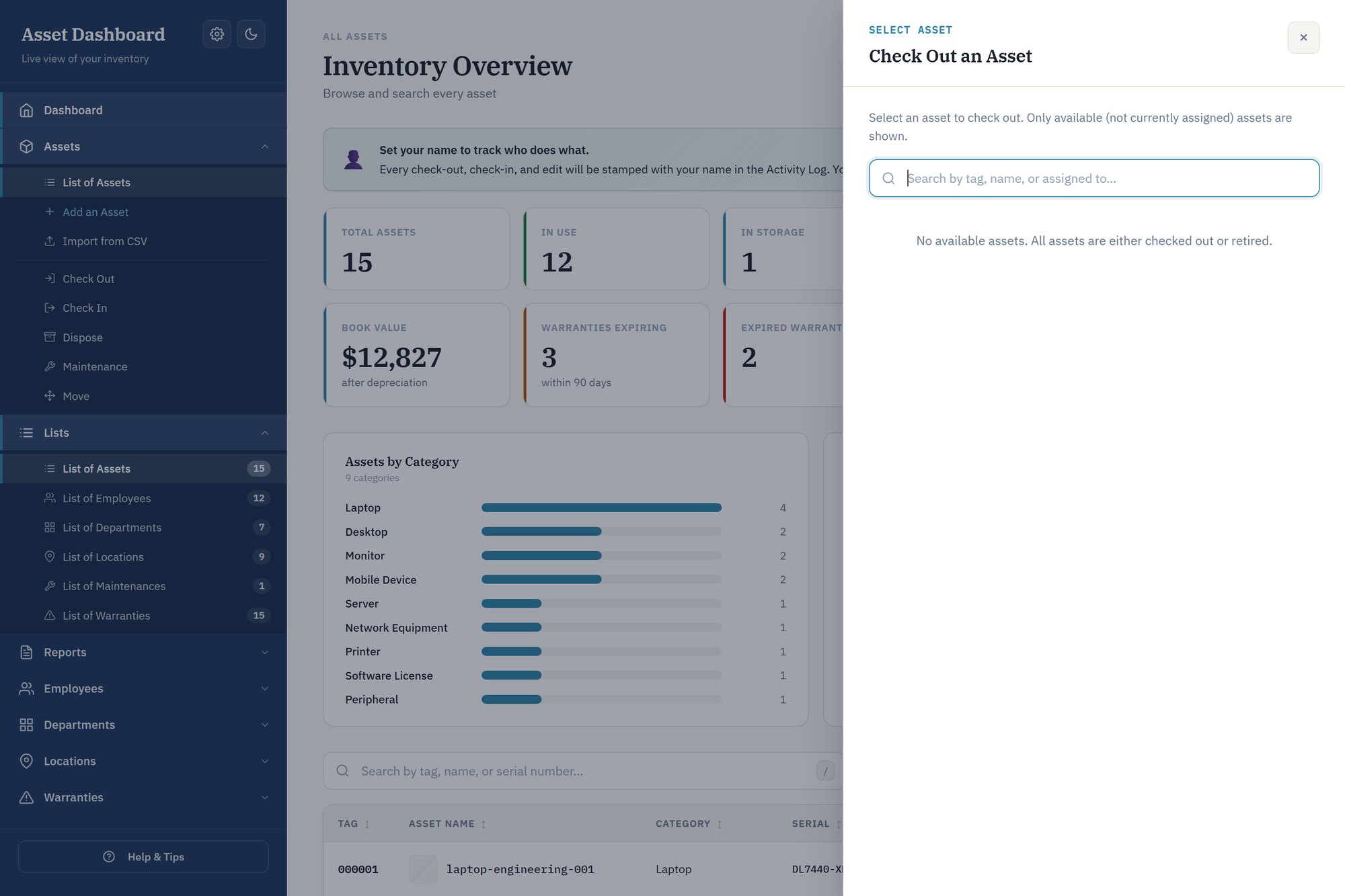
How it actually works
The small things you notice on day two
Press S anywhere to open the scanner and / to jump to search. There is a dark theme for a dim store room or a late night. The Save button tells you when something is unsaved rather than hoping you noticed, and if the browser closes on you your work is still there when you come back. Move an employee between departments and it tells you how many assets they are holding before you do it.
Two files, no installer
A spreadsheet holds your data. An HTML dashboard opens in your browser, reads that spreadsheet, and writes your edits back to it. Nothing is installed, nothing runs in the background.
Genuinely offline
The dashboard makes zero network requests. Everything it needs is inside the file, so it works on an air-gapped machine and cannot break because someone else’s server went away.
Your data is just a spreadsheet
Open it in Excel any time. No export step, no lock-in, no proprietary format. If you ever stop using the dashboard, your inventory is still a normal .xlsx.
Built for real inventories
Asset photos are compressed and stored in the workbook itself. Bulk import handles a thousand rows in a fraction of a second. Asset tags follow whatever numbering scheme you already use, including pre-printed barcode sheets.
How to track IT assets in a small business
What actually has to be recorded, how to make offboarding a query instead of a memory test, and the point at which asset management software is genuinely worth buying — including when it is not.
Ten sheets, and you can open every one of them
The dashboard is the nice way to use this, but the data is a plain
.xlsx and nothing is hidden from you. Open it in Excel, LibreOffice or Google Sheets
and you will find:
Dashboard · Assets · Asset Lookup · Employees · Employee Assets · Vendors · Departments · Locations · Transactions · Settings
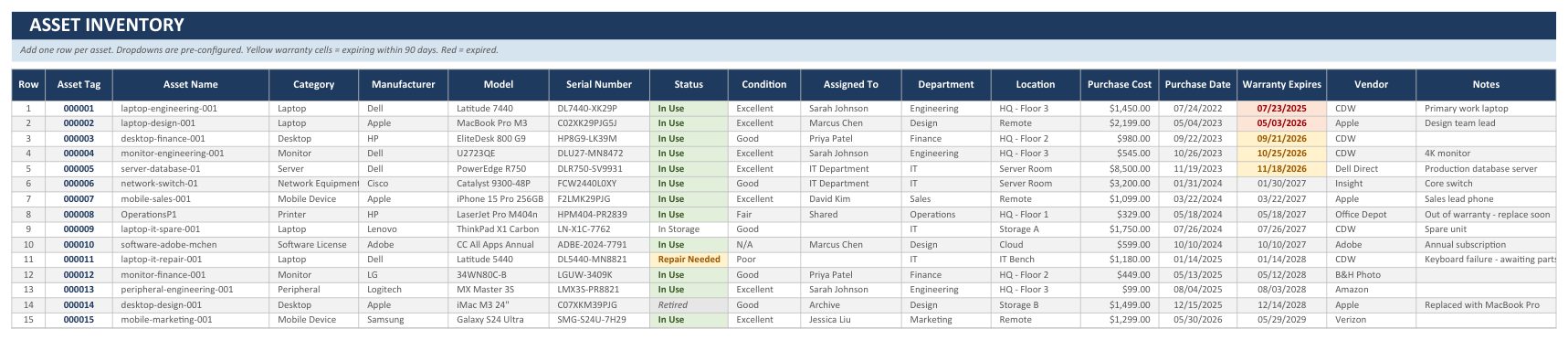
That is the Assets sheet as it arrives, opened in a spreadsheet rather than the dashboard. The dropdowns are already configured. The warranty column colours itself — amber inside 90 days, red once it has lapsed — so the sheet tells you what needs attention even if you never open the dashboard at all.
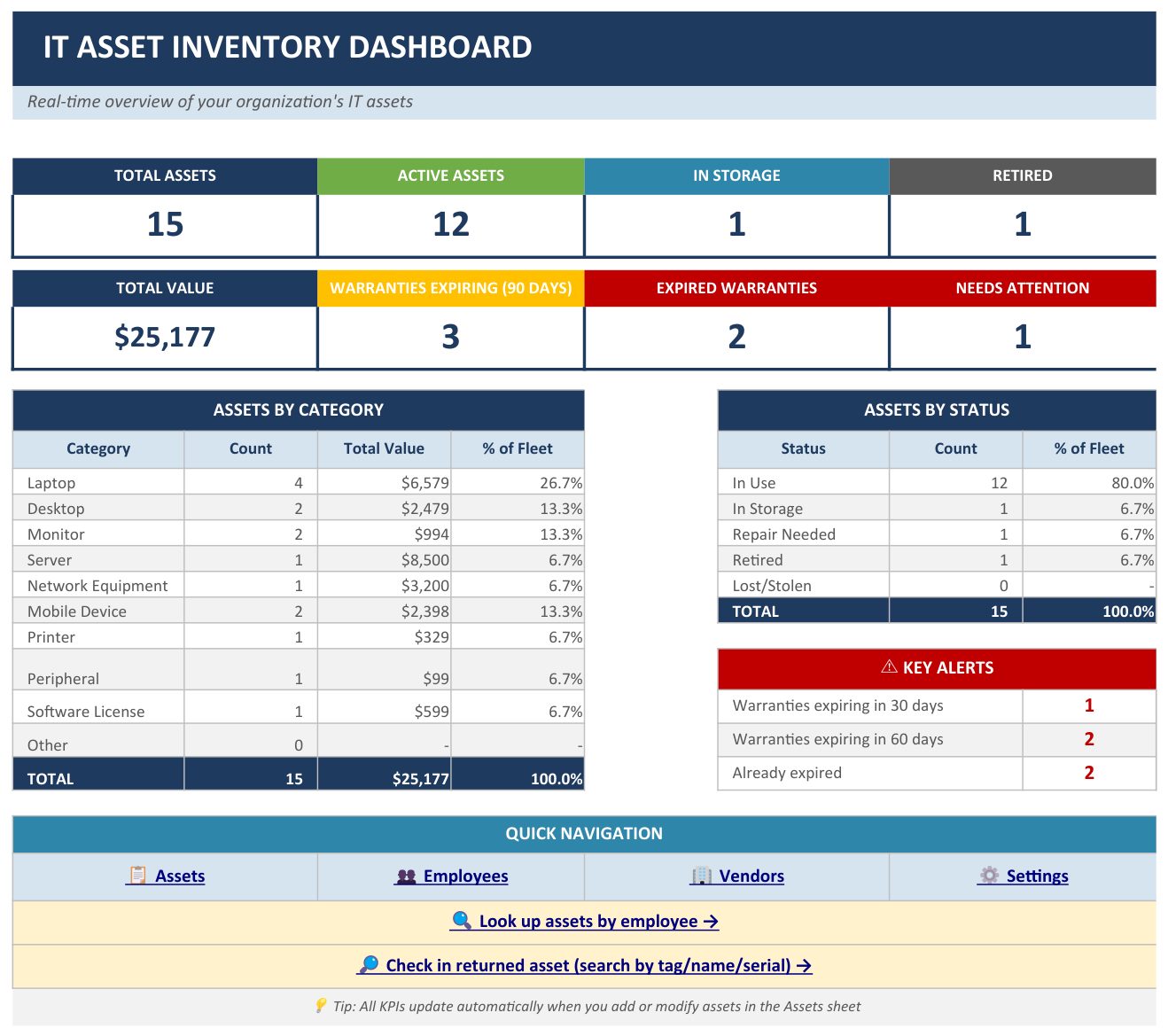
There is a Dashboard sheet inside the workbook too, and it is ordinary spreadsheet formulas rather than a macro — counts, totals, the category and status breakdowns and the warranty alerts all recalculate from the Assets sheet. Nothing to enable, nothing to trust.
Transactions is the check-out log — every movement appended, never overwritten. Employee Assets is the per-person view that makes offboarding a filter instead of a memory test. If you ever stop using the dashboard entirely, all of it is still there, in a file on your disk, in a format every spreadsheet program can read.
One download, five files, $149
A single payment. Every future update is free — including the ones already built and not yet released.
IT_Asset_Dashboard.htmlThe dashboard. Open it in Chrome or Edge.IT_Asset_Inventory_Tracker.xlsxYour blank tracker, ready to fill in.IT_Asset_Inventory_Tracker_DEMO.xlsxSample data, so you can look around first.QuickStart.pdfSetup guide, five minutes end to end.QuickStart.docxThe same guide, editable for your team.
Before you buy
Is there a monthly fee?
No. One payment of $149 and it is yours, including every future update. There is no renewal, no per-seat cost, and no price rise later.
How is this different from Snipe-IT?
Snipe-IT is free software you host yourself — a web server, a database and ongoing maintenance. This is a file you open. If you have someone to run a server and you want permissions and SSO, Snipe-IT is the better tool. If you do not, this exists for you.
Do I need Microsoft Excel?
Any spreadsheet program that opens .xlsx works — Excel, LibreOffice Calc, or Google Sheets. The dashboard itself needs only a browser.
Does it need an internet connection?
No. The dashboard makes zero external requests — the code it needs is inside the file. It works with the wifi switched off, and on restricted or air-gapped networks.
Where is my data stored?
In the .xlsx file, on your own machine. Nothing is uploaded anywhere and there is no account. Back it up the way you back up any other file.
Can the dashboard save changes back to the spreadsheet?
Yes. In Chrome and Edge it writes directly to the file you opened. In Safari and Firefox it downloads an updated copy instead, because those browsers do not support direct file access.
How many assets can it handle?
It is built for small and mid-sized estates — hundreds to a few thousand items. Bulk import processes a thousand rows in a fraction of a second.
Is this a subscription?
No. One payment, and updates are free for life. The files keep working regardless, because nothing depends on a server we run.
Can I use it for things that are not IT equipment?
Yes — the underlying model is items assigned to people at locations, so tools, AV gear or lab equipment all fit. The labels and categories are written for IT.
Does it work on a Mac?
Yes. Use Chrome or Edge for direct save-back; Safari downloads an updated copy instead.
The honest comparisons
Written to be useful whether or not you buy anything — each one says plainly what the other tool asks of you, and where it is the better answer.
Ask me before you buy
There is no support desk here — it is one person, and I answer my own email. If you are not certain this fits what you manage, say what you are tracking and I will tell you straight, including if the answer is that it does not fit.
Need it to track something this one does not?
Most people never need this — the Lists tab renames every dropdown and columns can be changed in place. But if your business needs fields the workbook does not have, we will rebuild it around your process rather than ask you to bend yours around ours. One payment, you own the file, and we will tell you plainly when you do not need it.
Look at it before you decide
The demo is the real dashboard with sample data loaded. Every screen works — click into the reports, drill into a warranty, sort the asset list.